
Articles
-
 This is an example of a solution that we prepared for someone else. The solution that we prepare for you will be based on your particular needs. However, it’s a good way for you to get an idea of how we work and a great way to start a conversation about how your needs are similar or different. The Customer’s Circumstances. There were two customers. One was a government contractor that wanted to see how their proposals stacked up against our standards. The other was a small mom and pop finan
- 0 comments
- 5,198 views
-
 One of the most common questions we get is, "What should my proposal look like?" So when a company we’ve teamed with many times in the past started talking about producing some templates to help people format their proposals, we told them we have a few thousand friends who might be interested. As a result of that conversation, we now have a bunch of proposal formats available. Only these aren’t just any proposal formats. These are designed by the 24 Hour Company. If you don’t know them, the
- 0 comments
- 3,924 views
-
 Winning proposals is about information. But that knowing that fact alone is not enough to produce a competitive advantage. Gathering a bunch of information does not magically lead to winning. Winning is not even based on who gathers the most information. Here are five steps to gain an information advantage and turn it into a competitive advantage. Figure out what information you need and get it. The secret here is that you need to develop the right relationships and ask the right questio
- 0 comments
- 5,833 views
-
 One of our customers had asked us to provide them with training so they could do a better job of preparing for an upcoming proposal. Naturally, before the training could get started they received notice that a customer was about to release an RFP, and had released a draft. So we incorporated the draft into the training. But the approach we took surprised me with how effectively it opened their eyes, how well it reached beyond just the proposal specialists, and how it contributed to real organiza
- 0 comments
- 4,109 views
-
 We have a lot of content. And our users have different needs. This can make for a deep and rich experience. It can also be overwhelming at first. This page provides information on how to find the content we have published that best meets your needs. The easy way to use our site Simply follow your interests by clicking links and spend countless hours reading, learning, and gaining inspiration. Becoming a power user There are methods behind our madness and once you learn them you can
- 0 comments
- 7,834 views
-
Frequently asked questions about the Score program
- 0 comments
- 1,346 views
-
 Carl Dickson, Founder of CapturePlanning.com and PropLIBRARY sat down for an interview with Ashley Kayes and Baskar Sundaram of the Scribble Talk Podcast. He shared some insights into the nature of proposals as well as some details about himself that have never been published before. 90
- 0 comments
- 715 views
-
 The normal way to work with a consultant is to agree on a scope, budget, and schedule for what needs to be done. This requires discussion, getting to know each other, some back-and-forth, and some risk. We can spend a lot of time talking about it and then face the risks in performance, or we can get right to work on something relevant but small that mitigates those risks. The projects described below can jumpstart the process, with four ways we can work together for under $5,000. They cover
- 0 comments
- 7,152 views
-
 When we think of partnerships we think of something far more strategic than referrals. We like partnerships that force us both to revise our business plans. In our experience, partnerships that don't require investment by both parties have a low probability of success. We have occasionally taken on sponsors when companies wanted to get in front of our audience but lacked a capacity for cross-promotion. When we have complementary offerings, we're open to bundling and other forms of cros
- 0 comments
- 1,961 views
-
 The traditional way to define roles for a proposal usually includes: A Capture Manager to define the offering A Proposal Manager to implement the process Proposal Writers to follow the process and create the proposal narrative Under this model, the Proposal Manager seeks to bring together the solution and the writers to get it all on paper. The Proposal Manager brings together the Capture Manager and Proposal Writers so that bid strategies can be articulated and used to
- 0 comments
- 6,070 views
-
We're adding features that will turn our huge library of incredibly useful content into online training courses with exercises, quizzes, videos, and more. But that's not all... There will be special features for Corporate Subscribers. They involve customization, certification, live instructor integration, real proposal participation tracking, transcripts, mentorship programs, and more. It's not just about training. They turn PropLIBRARY into a strategic tool for developing a
- 0 comments
- 1,392 views
-
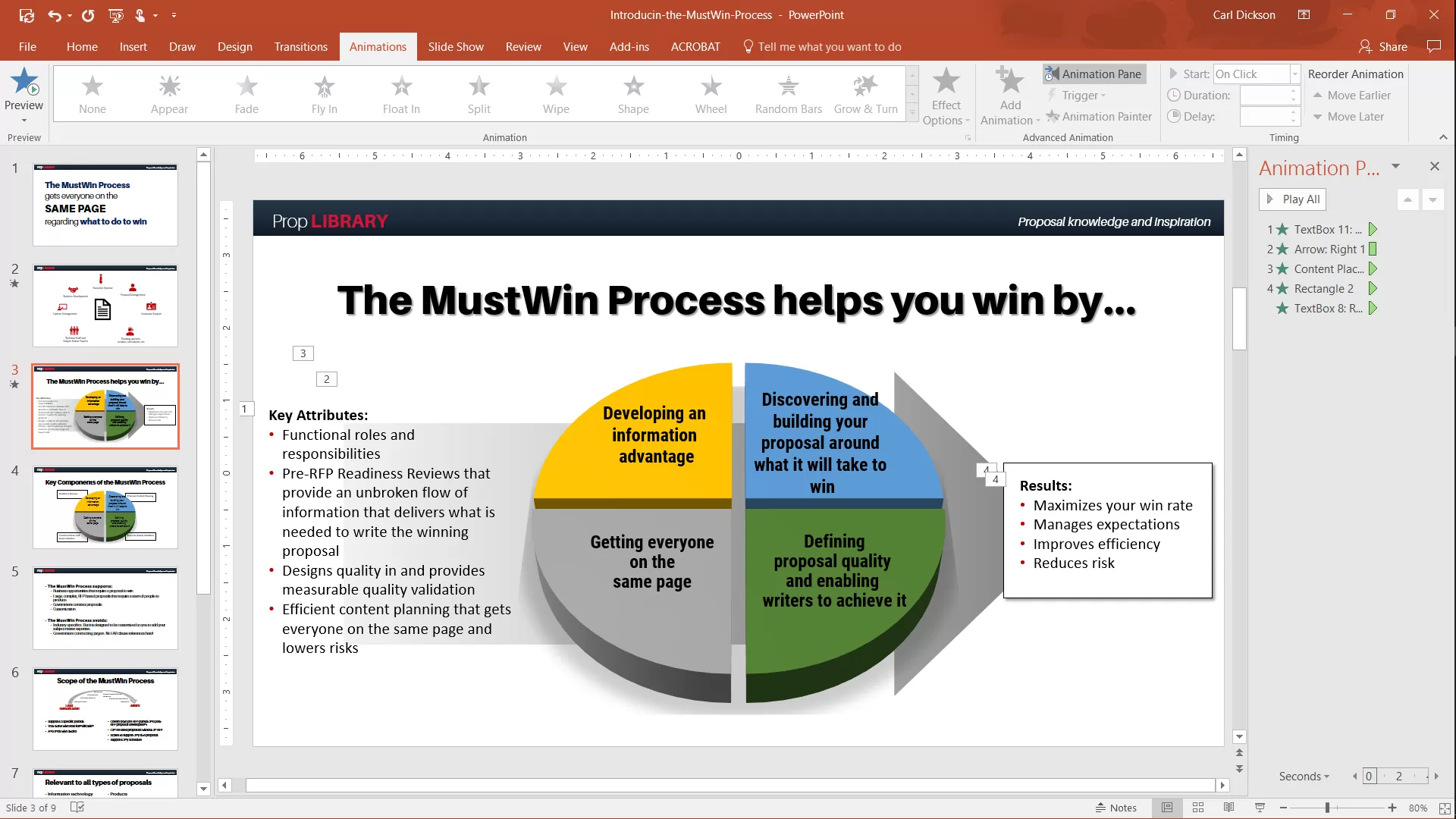 So here's our plan for world conquest. First we developed software that lets us repurpose our huge content library as online courses, complete with videos, quizzes, exercises, transcripts, and more. Next we're going to develop about a week's work of training. The basic stuff needed to implement our recommendations will be included with a regular PropLIBRARY Subscription. Additional courses that explain how to customize our approaches, adapt them, or use them for organizational development will b
- 0 comments
- 2,763 views
-
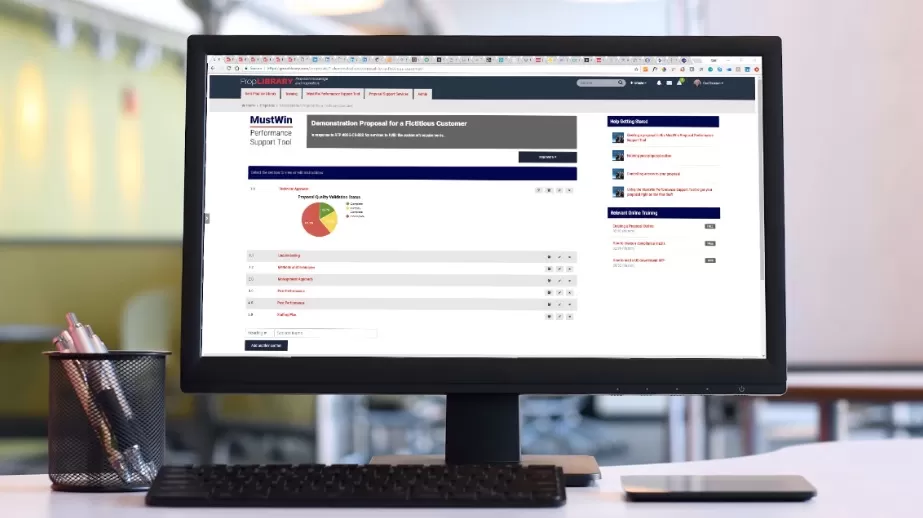 Honestly, it's an approach I just stumbled upon. I wasn't really looking for it. If I say that it has the potential to radically change how people go about winning proposals, that might sound a bit grandiose. But that is exactly what I think it can do. Just not in a way that anyone expects. Imagine combining what you see below with all of our process guidance, online training, proposal recipes, etc., into a single integrated environment. If you do complex proposals with multiple people involved,
- 0 comments
- 6,359 views
-
 All you need to do to produce a winning proposal is give the customer the information they need to decide in your favor. It really is that simple. And that totally hides how difficult it really is. While what you need to do is simple to understand, it is hard to achieve. Here are six top problems that get in the way of keeping proposals simple: You have to know what information the customer needs. It’s not about you or your offering. It’s all about them. It's their decision. Wha
- 0 comments
- 3,036 views
-
 It’s often over before it even starts. Except for the tragic part where people work long hours, struggle, argue, blame, and sometimes cry. Most proposals go bad right at the beginning, even if you don’t feel the pain until later. The reverse is also true. Proposals can be won before they start. They can be straightforward to produce, or they can be like pulling teeth. It comes down to whether you start with an information advantage, and if you can figure out what to do
- 0 comments
- 2,336 views
-
HAPD Week 12: Advanced Proposal Topics and the Rapid Proposal Writing Workshop All bold red fonts are links. Monday, 10-June-2019 Module 11.3 - Post Proposal and Protests. In the afternoon, we'll review the module on post proposal activities and protests (due to scheduling conflicts, this module will actually be presented on Monday of Week 12). Module 12.1 - Introduction to Federal Program Management. This module introduces students to project and performance manag
- 0 comments
- 646 views
-
HAPD Week 11: Preparing for Gold Team and the Final Exam All bold red fonts are links. Monday, 03-June-2019 Virtual Red Team Recovery. Finish making final revisions and documenting your writer disposition for all red team feedback. Tuesday, 04-June-2019 Pens Down. Pens down for Gold Team at Noon Meet with Dan and Angela: Students meet with Dan and Angela from 1:00 PM ET - 3:00 PM ET. Module 11.1 - Gold Team. At 3:30 PM ET, we'll review the module on
- 0 comments
- 660 views
-
HAPD Week 10: Red Team Review and Recovery All bold red fonts are links. Monday, 27-May-2019 Memorial Day Holiday. No class. Tuesday through Wednesday, 28 & 29-May-2019 Red Team Review Proposal Writers stand down Thursday and Friday, 30 & 31-May-2019 Combined Reviewer Consensus/Proposal Team Debrief - reviewers present feedback and deconflict opposing recommendations for the proposal team Recovery Planning - proposal writers revie
- 0 comments
- 1,003 views
-
HAPD Week 8: Path to Red Team All bold red fonts are links. Monday, 13-May-2019 Pink Team Recovery Plan - Phil will facilitate a team discussion in the afternoon to agree to a uniform structure for all of the PWS Mission Area proposal sections Self-Study Modules - we have three self-study modules: 8.1 covers writing to the RFP requirements, 8.2 covers Red Team writing and planning, and 8.3 covers interviewing SMEs (note that Module 8.3 will be posted Monday) Q
- 0 comments
- 363 views
-
HAPD Week 9: Red Team Preparations All bold red fonts are links. Monday, 20-May-2019 Cohort Past Performance Live Edits - You will meet in your cohorts today to perform live edits of your past performance documents - work to get into page count and resolve open issues Next Steps Review - we'll review final preparation next steps for Red Team Signup Sheet - Sign up for extended 1:1 reviews (here) during which we'll review gradebooks for the current period and r
- 0 comments
- 531 views

